

Blog · Nov 11, 2026
Introducing Drex for Document Processing: document processing your agents can trust
Nace.AI
Drex for Document Processing
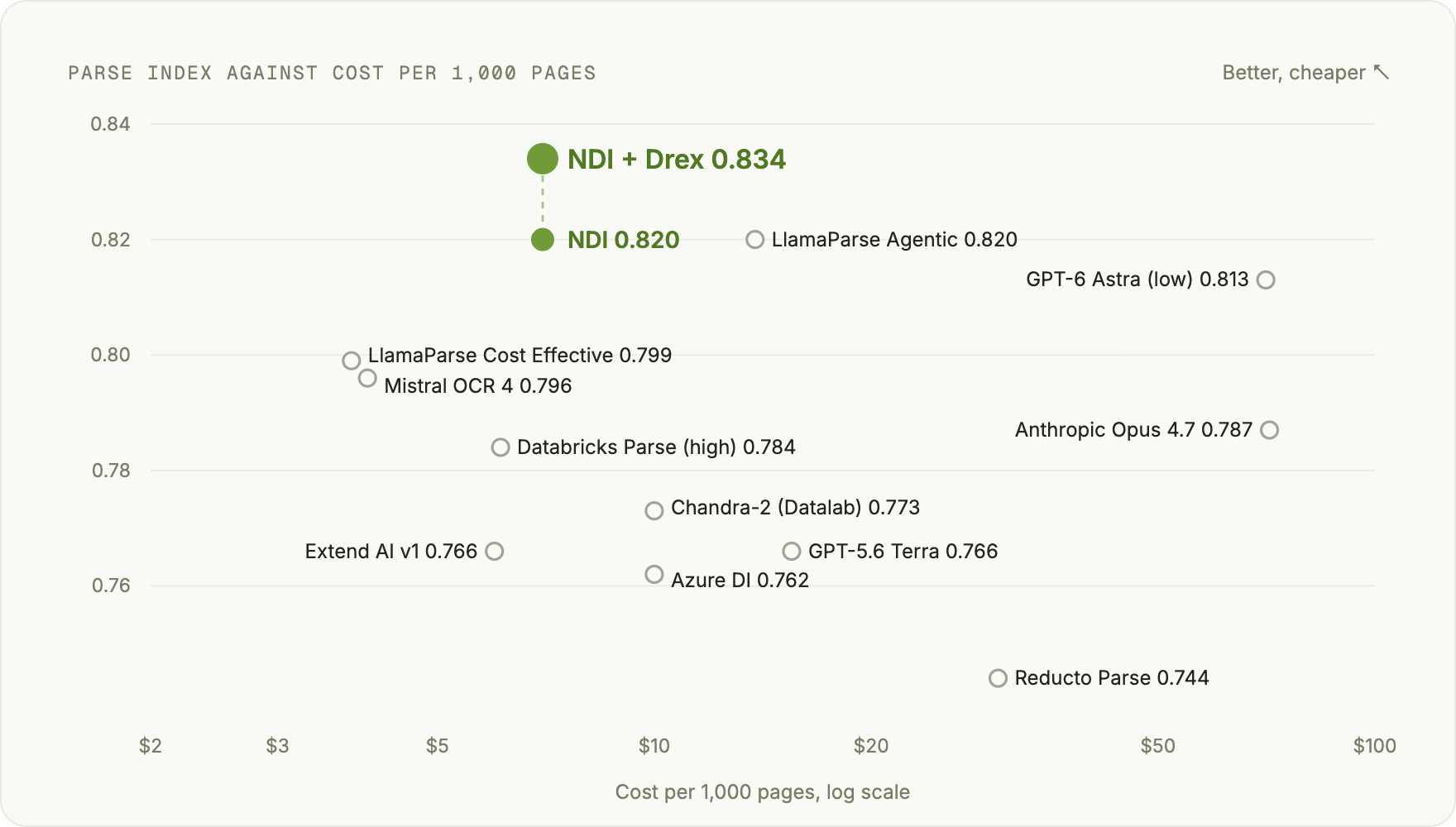
The best Parse Index on our leaderboard, 0.834, ahead of all 12 parsers we tested.
Every document workflow starts the same way. Before an agent can approve an invoice, check a contract or reconcile a statement, something has to read the file. Most of the time that's OCR that loses the tables, or a frontier model that reads every page at frontier prices. Either way, what comes out is text nobody has checked.
Today we're introducing Drex for Document Processing. Drex is our decision model, and it now makes the judgment calls everywhere inside our document processing engine: whether a line of text matches the page, whether a table kept its shape, whether a ticked box survived the scan. It reads any of 30 file types and returns layout-aware Markdown, where tables stay tables and every block keeps its place on the page.
Drex for Document Processing:
- has the best Parse Index on our leaderboard, 0.834, ahead of all 12 parsers we tested,
- improves on the engine alone on 3 of the 6 benchmarks, OmniDocBench, MDPBench and ExtractBench, and is within noise of it on 2 more, ParseBench and RealDocBench,
- reads phone photos of documents, scoring 91.9 on MDPBench, 8.3 points ahead of the next best parser,
- scores 95.7 on OmniDocBench, 5.4 points ahead of the next best parser,
- and corrects pages 28 to 38 percent faster than rewriting every page, with the slowest pages more than twice as fast.
It works through the Console, a REST API, a CLI, and Python and TypeScript SDKs, all on the same API key as the rest of Drex.
Why document pipelines break
Documents don't arrive clean. They arrive as scanned forms, phone photos, 200-page filings, and spreadsheets with merged headers.
Standard OCR recovers the words and loses the rest: the table becomes a run of numbers, the ticked box disappears, a smudged figure turns into a different figure. Sending every page to a frontier model fixes some of that, but it's slow and expensive at volume. So teams add rules, then exceptions to the rules, then people to check the exceptions.
How Drex for Document Processing works
Most of the work in reading a document is judgment: is this text right, did this table keep its rows, is that box ticked or not. Drex for Document Processing makes those calls on every page.
Read. The engine turns the file into layout-aware Markdown. Tables stay tables, and every block keeps its place on the page.
Check. Drex checks what was read against the page image.
Correct. Where the reading and the page disagree, our agentic correction pipeline fixes the text. If a correction comes back empty or much shorter than the original, the original reading is kept, so a failed correction never blanks a page.
Take a scanned expense form with three ticked boxes. Standard OCR returns "Receipts attached: Yes No" for each, with the ticks gone. Drex for Document Processing returns "Receipts attached: [x] Yes □ No", ticks restored on all three, and every line still carries its place on the page.
Where Drex fits
Drex answers narrow questions, such as "does this OCR line match the image?", with a calibrated probability, in about 50 milliseconds, for about $2 per million answers. That's what lets the engine check every page and spend its heavy reading only where something is in doubt.
Beyond OCR
Every generation of document software read a little more of the page. OCR read the characters. Layout models read the structure. Vision-language parsers read the page as an image. Frontier models read everything, at frontier prices.
Drex for Document Processing reads like a careful analyst: fast where the page is clear, careful where it isn't, and it checks its own work before it hands the page back.
Results
Parsing leaderboard
On our parsing leaderboard, we compared our engine against leading document parsers and frontier models, and measured what each one costs to run. With Drex, it now tops it.
| Rank | Parser | Parse Index | Cost per 1,000 pages |
|---|---|---|---|
| 1 | NDI + Drex | 0.834 | $7.00 |
| 2 | NDI | 0.820 | $7.00 |
| 2 | LlamaParse Agentic | 0.820 | $13.80 |
| 4 | GPT-6 Astra (low) | 0.813 | $70.57 |
| 5 | LlamaParse Cost Effective | 0.799 | $3.80 |
| 6 | Mistral OCR 4 | 0.796 | $4.00 |
| 7 | Anthropic Opus 4.7 | 0.787 | $71.40 |
| 8 | Databricks Parse (high) | 0.784 | $6.12 |
| 9 | Chandra-2 (Datalab) | 0.773 | $10.00 |
| 10 | Extend AI v1 | 0.766 | $6.00 |
| 10 | GPT-5.6 Terra | 0.766 | $15.51 |
| 12 | Azure DI | 0.762 | $10.00 |
| 13 | Reducto Parse | 0.744 | $30.00 |
Parse Index is the aggregate score of our parsing leaderboard. Higher is better. Costs are USD per 1,000 pages at each provider's list price. Every parser's score on every benchmark is on our Perception page.
Benchmark by benchmark
Here is how NDI + Drex does on each benchmark in the leaderboard, against NDI alone and the other 11 parsers.
| Benchmarks | NDI + Drex | NDI | LlamaParse Agentic | GPT-6 Astra (low) | LlamaParse Cost Effective | Mistral OCR 4 | Anthropic Opus 4.7 | Databricks Parse (high) | Chandra-2 (Datalab) | Extend AI v1 | GPT-5.6 Terra | Azure DI | Reducto Parse |
|---|---|---|---|---|---|---|---|---|---|---|---|---|---|
| Overall | |||||||||||||
| Parse Indexleaderboard aggregate | 0.834 | 0.820 | 0.820 | 0.813 | 0.799 | 0.796 | 0.787 | 0.784 | 0.773 | 0.766 | 0.766 | 0.762 | 0.744 |
| Public document benchmarks | |||||||||||||
| OmniDocBenchtext, tables, formulas | 95.7 | 92.6 | 89.4 | 89.6 | 87.4 | 89.2 | 88.2 | 90.3 | 88.6 | 85.9 | 89.1 | 86.3 | 83.1 |
| MDPBenchphone photos, digital pages | 91.9 | 85.9 | 83.6 | 80.6 | 79.8 | 78.7 | 74.6 | 77.3 | 83.2 | 79.7 | 73.1 | 80.0 | 71.0 |
| ParseBenchcontent faithfulness | 90.85 | 91.16 | 91.78 | 90.67 | 89.87 | 89.55 | 90.26 | 88.25 | 83.70 | 84.59 | 82.56 | 84.93 | 86.37 |
| RealDocBenchQA from parsed text | 0.857 | 0.868 | 0.846 | 0.917 | 0.803 | 0.824 | 0.841 | 0.833 | 0.781 | 0.836 | 0.825 | 0.796 | 0.785 |
| ExtractBenchsource quotes found | 0.586 | 0.562 | 0.582 | 0.5725 | 0.569 | 0.557 | 0.571 | 0.546 | 0.544 | 0.522 | 0.541 | 0.524 | 0.544 |
| Financial documents | |||||||||||||
| Internal financialtables in financial docs | 95.5 | 97.5 | 97.0 | 96.2 | 95.9 | 97.5 | 94.6 | 92.6 | 91.9 | 90.5 | 95.3 | 90.8 | 89.7 |
| Cost | |||||||||||||
| Cost per 1,000 pagesUSD, list price | $7.00 | $7.00 | $13.80 | $70.57 | $3.80 | $4.00 | $71.40 | $6.12 | $10.00 | $6.00 | $15.51 | $10.00 | $30.00 |
NDI + Drex improves on NDI on OmniDocBench, MDPBench and ExtractBench. On ParseBench and RealDocBench the two are within noise of each other.
Speed
Drex decides which parts of a page need a second look, so the correction step rewrites only what is in doubt instead of the whole page. To measure the difference, we gave both approaches the same first reading of every page, so the only thing that changes is the correction.
| Benchmark | NDI | NDI + Drex | Faster at the median | Faster on the slowest 10% of pages |
|---|---|---|---|---|
| ParseBench | 15.6 s | 9.8 s | 37% | 55% |
| RealDocBench | 20.2 s | 12.5 s | 38% | 57% |
| MDPBench (English) | 26.7 s | 19.1 s | 28% | 53% |
Times are the median correction time per page, in seconds, averaged over two runs. Lower is better. The slowest pages gain the most, because a dense page no longer means a long rewrite.
Get started
Upload a file and parse it on high effort:
from nace_sdk import NaceClient

with NaceClient() as client:  # reads NACE_API_KEY
    uploaded = client.documents.upload("statement.pdf")
    job = client.documents.parse(
        uploaded.as_source(), parse_mode="high", wait_seconds=60
    )
    if job.status != "succeeded":
        job = client.jobs.wait(job.job_id)

print(job.result["document"]["markdown"])
Drex for Document Processing reads PDFs and scans, Word, PowerPoint and Visio, Excel and CSV, email and HTML, and images. Spreadsheets are read cell by cell, so merged headers and multi-row tables keep their shape.
It runs where your files are allowed to be: our managed cloud, a dedicated cluster, your own AWS or Azure account, or your own data center with no outbound connection. The models and the API are the same at every tier.
Drex for Document Processing is available today in the Nace Console. Try it for free, or read the parse docs.